Actions are a convenient and effective means of extending the classic flow of analytics. Use the Actions panel to configure specific actions that will be triggered when a user clicks somewhere on the visual. To learn about support for MS SSAS defined Actions, see Cube Actions.
Note: Discovery Actions are not available in the Community edition.
Tip: To learn about using Actions in Present, click here.
Configuring Actions
Opening the Action panel
Actions are configured from the Action panel, which is opened using the Actions button on the Home ribbon:

Action Types
The types of action that you can configure from the Action panel include:
- Jump to Content Item: When the specified trigger element is selected, open a different discovery or presentation.
- Jump to URL: When the specified trigger element is selected, the dynamic PQL functions are used to produce a URL.
- Execute JavaScript: When the specified trigger element is selected, a JavaScript function is executed.
- Tooltip: Create a tooltip that displays a specified discovery or presentation.
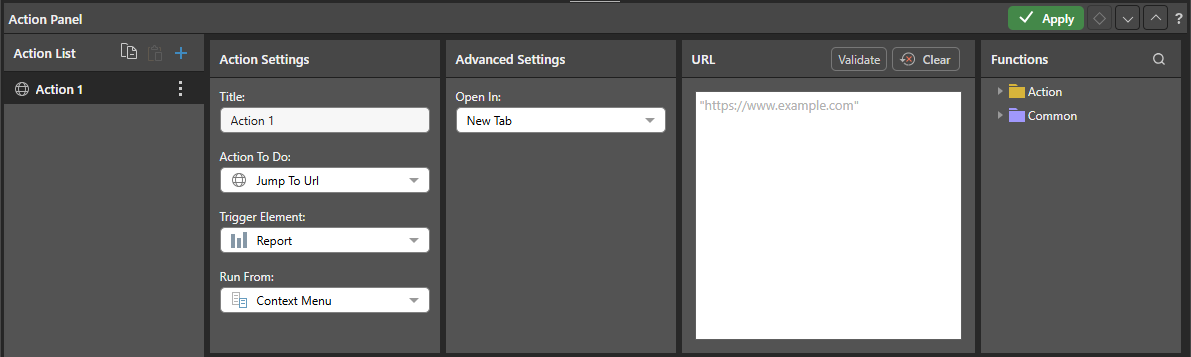
Tip: Actions can be replicated across multiple reports, edited, and deleted as needed. For more information, see Action Panel in Discover Pro.
Cube Actions
When working with MS OLAP, Tabular, and BW models, actions that were configured in the data source can be executed in Pyramid. For more information, see Cube Actions.
Run Actions
You can access actions through the Actions context menu, which opens on the right-click context menu:
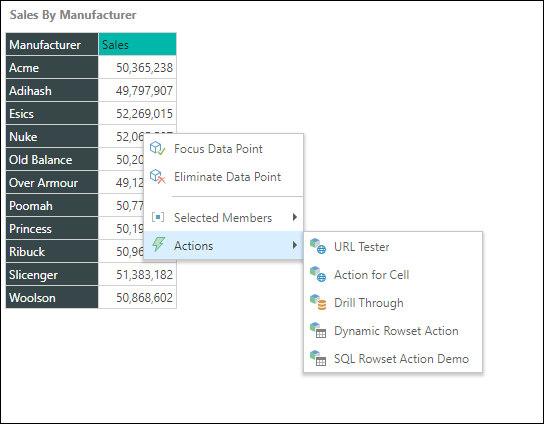
Note: The preceding screen shot shows both a Report Action that was configured in the discovery (green arrow above) and some Cube Actions defined in MS OLAP and Tabular (orange highlight).